The Contacts.Merge method allows you to synchronize different contact data by adding new contacts or modifying existing contact data. This method is used, among other things, to synchronize contact consent statuses from an external system (website, CRM, application) to a Dialog Insight project. For example, a visitor to your website fills out a form and checks a box to receive your newsletter. The form information regarding consent is transferred with a call to the Contacts.Merge method. This article presents different ways to write the query depending on the scenario.
→ Contacts.Merge Method (Canadian Platform)
→ Contacts.Merge Method (French Platform)
Recommended Reading
Precisions About the Consent Status
The value associated with the consent indicates if the contact is subscribing (1) or unsubscribing (0).
| "optin_Newsletter": "1", |
To send an opt-in status, you must use optin_ as a prefix before the opt-in field code.
To find the opt-in field code, go to Project → Data Management → Project Fields → Opt-in management. In the Explicit Consents (or Implicit Consents), double-click the field, and you will see the field of the code: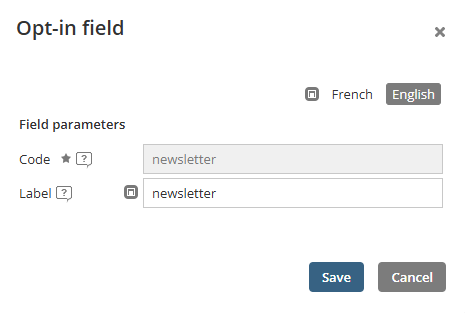
In this case, we would write optin_newsletter since the code is newsletter.
Case 1: Creating Subscribers
Goal: Create new contacts in Dialog Insight, including the opt-in and basic info (first name and last name).
    "AuthKey": {
         "idKey": 5335,
         "Key": "abcdefghijklmnopkrstuvwxyz"
    },
     "idProject": 123456,

//In the example, 2 contacts are created and subscribed to the newsletter.
    "Records": [
        {
            "ID": {
                 "key_f_EMail": "claire@domain.com"
            },
            "Data": {
                 "f_FirstName": "Claire",
                 "f_LastName": "Brown",
                 "optin_Newsletter": "1",
            }
        },
        {
            "ID": {
                "key_f_EMail": "marc@domain.com"
            },
            "Data": {
                 "f_FirstName": "Marc",
                 "f_LastName": "Tremblay",
                 "optin_Newsletter": "1",
            }
        },
    ],

    "MergeOptions": {
        "AllowInsert": true,
        "AllowUpdate": false,
        "SkipDuplicateRecords": false,
        "SkipUnmatchedRecords": false,
        "ReturnRecordsOnSuccess": false,
        "ReturnRecordsOnError": false,
        "FieldOptions": null
    }
}
// You must set AllowInsert to true to allow new contact creation. |
Case 2: Subscription Preferences Update
Goal: Subscribing or unsubscribing an existing contact, limiting the data to the consent (to avoid overwriting data in the contact profile).
    "AuthKey": {
         "idKey": 5335,
         "Key": "abcdefghijklmnopkrstuvwxyz"
    },
     "idProject": 123456,

// In this example, we update 3 contacts.
// Claire and Marc subscribe to the newletter (1), while Paul unsubscribes (0).
    "Records": [
        {
            "ID": {
                "key_f_EMail": "claire@domain.com"
            },
            "Data": {
                "optin_Newsletter": "1",
            }
        },
        {
            "ID": {
                "key_f_EMail": "marc@domain.com"
            },
            "Data": {
                "optin_Newsletter": "1",
            }
        },
        {
            "ID": {
                "key_f_EMail": "paul@domain.com"
            },
            "Data": {
                "optin_Newsletter": "0",
            }
        },
    ],

    "MergeOptions": {
        "AllowInsert": false,
        "AllowUpdate": true,
        "SkipDuplicateRecords": false,
        "SkipUnmatchedRecords": false,
        "ReturnRecordsOnSuccess": false,
        "ReturnRecordsOnError": false,
        "FieldOptions": null
    }
}
//You must set AllowUpdate to true for the existing contacts to be updated. |
Case 3: Full Synchronization
Goal: Create new contacts and modify data from existing contacts.
    "AuthKey": {
         "idKey": 5335,
         "Key": "abcdefghijklmnopkrstuvwxyz"
    },
     "idProject": 123456,

// In this example, 2 contacts (Claire and Marc) are created and subscribed to the newsletter.
// Paul, an existing contact unsubscribes to the newsletter.
    "Records": [
        {
            "ID": {
                 "key_f_EMail": "claire@domain.com"
            },
            "Data": {
                 "f_FirstName": "Claire",
                 "f_LastName": "Brown",
                 "optin_Newsletter": "1",
            }
        },
        {
            "ID": {
                "key_f_EMail": "marc@domain.com"
            },
            "Data": {
                 "f_FirstName": "Marc",
                 "f_LastName": "Tremblay",
                 "optin_Newsletter": "1",
            }
        },
        {
            "ID": {
                "key_f_EMail": "paul@domain.com"
            },
            "Data": {
                "optin_Newsletter": "0",
            }
        },
    ],

    "MergeOptions": {
        "AllowInsert": true,
        "AllowUpdate": true,
        "SkipDuplicateRecords": false,
        "SkipUnmatchedRecords": false,
        "ReturnRecordsOnSuccess": false,
        "ReturnRecordsOnError": false,
        "FieldOptions": null
    }
}
// You must set AllowInsert to true to allow new contact creation.
// You must set AllowUpdate to true for the existing contacts to be updated. |
Good Practices
- Limit the data included in the call to the consent (for updates).
- Verify in the contact list if the import was processed correctly.
- Use the NullHandling property to manage empty values.
Was this article helpful?
That’s Great!
Thank you for your feedback
Sorry! We couldn't be helpful
Thank you for your feedback
Feedback sent
We appreciate your effort and will try to fix the article